 Outfello
Use case
Virtual try-on with your own clothes
Outfello offers virtual try-on with your own clothes by rendering cut-out garments onto one full-body reference photo of you. A single piece or a whole saved outfit can be rendered on request, and nothing is rendered at import. Each render uses one try-on from the plan's monthly allowance, and a failed render returns the credit.
A flat cut-out of a jacket tells you its colour and shape. It does not tell you whether it looks right on you with those trousers. Virtual try-on with your own clothes closes that gap: Outfello takes garments you have already imported and renders them onto a photo of you. This page covers how that works, what the reference photo needs, and where the limits are.
How it works
You add one full-body reference photo of yourself to your account. From then on, any piece in your wardrobe can be rendered onto that photo when you ask for it. The result is a wear-on photo, which appears in the piece editor beside the garment's cut-out.
A cut-out beside its wear-on photo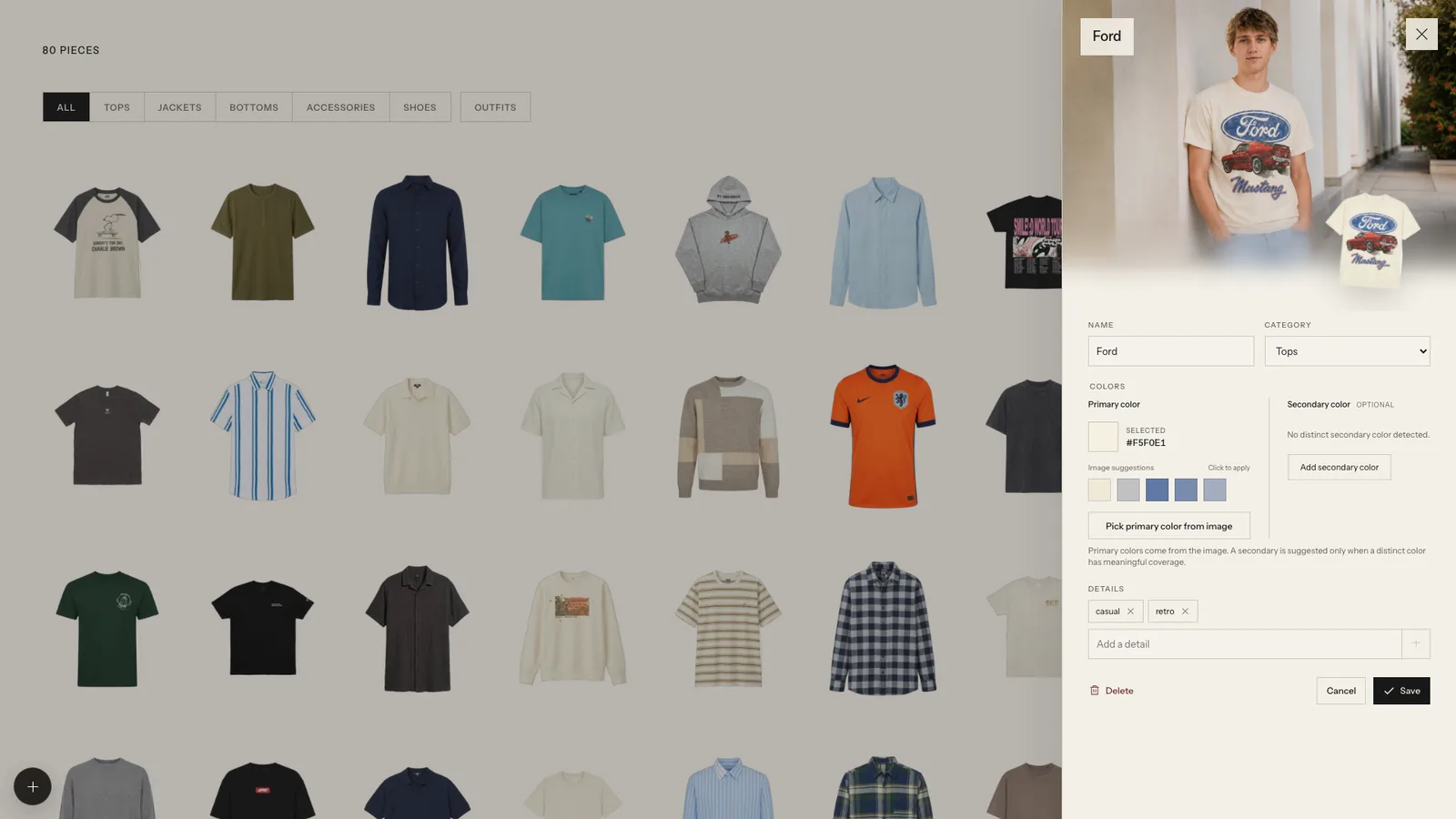
The same applies to whole outfits. In the outfit builder you stack a jacket, top, bottoms, shoes and accessories, save the look, and can render it head to toe on your reference photo in one go. That is a single try-on for the whole outfit, not one per piece.
Nothing is rendered automatically. Importing a photo detects and cuts out the clothes in it, but a try-on only happens when you request one. That keeps your allowance for the pieces and looks you are actually unsure about.
What the reference photo needs
The render can only be as good as the photo it starts from. The requirements are simple:
- Full body. Head and feet both in the frame. A photo cropped at the knees cannot show trousers or shoes.
- Facing the camera. A straight-on pose, not turned to the side or mid-stride.
- Clear view of your shape. Fitted, plain clothes give the model a better idea of your proportions than a long coat or a busy print.
- Even light. Daylight from a window or bright, soft indoor light. Harsh shadows or strong backlighting make results less consistent.
A mirror selfie can work if your phone is not covering your face and your feet are visible. A photo taken by someone else, or on a timer, is usually easier. The reference photo guide goes through framing, pose and lighting in detail.
What it is useful for
- Checking a combination before wearing it. Colours that look fine as cut-outs sometimes clash on a body, or a proportion looks off once the jacket's length is visible against your height.
- Comparing options. Render two versions of a look and compare the results.
- Judging a shop item against what you own. Import a product screenshot, then render it with pieces already in your wardrobe.
If you plan outfits in advance, the outfit planner page shows how try-on fits in with the builder and saved looks.
Credits, attempts and limits
Each render uses one try-on from your plan's monthly allowance. If generation fails, the credit is returned, so a broken render does not cost you anything. Each piece has a limited number of wear-on attempts, which stops one stubborn garment from eating your whole month.
The free plan includes a few try-ons a month, and the paid plans include more. Try-ons and imports are counted separately; running out of try-ons never blocks importing clothes, and the reverse is also true. Current allowances are on the pricing page.
What it does not do
Being clear about scope:
- It is not a measurement or sizing tool. The render shows how a garment might look on you, not whether a particular size will fit.
- It does not animate or show you from other angles. Renders start from the single pose in your reference photo.
- It works from your own photo only. There is no library of stock models to choose from.
- Results are generated by an AI image model, so details such as small logos, fine patterns or exact fabric texture can come out simplified. Treat a render as a strong hint, not a guarantee.
For a plain-language explanation of what happens between the request and the result, read how AI virtual try-on works.
Getting started
Take the reference photo first, before importing anything else, so it is ready when you want it. Then pick one outfit you are genuinely undecided about and render it. A single honest comparison is the fastest way to see whether try-on is useful for the way you dress.
Questions
Frequently asked questions
- What kind of photo do I need?
- One full-body photo of yourself, facing the camera, with your head and feet in the frame. Plain, well-fitted clothes and even light make the renders more reliable.
- Are try-ons generated automatically when I import clothes?
- No. Nothing is rendered at import. You ask for a render on a specific piece or outfit, and only then is a try-on used.
- What happens if a render fails?
- If generation fails, the try-on credit is returned to your monthly allowance. You can then try again, within the limited number of wear-on attempts each piece has.
- Can I try on clothes from a shop before buying them?
- You can import a screenshot of a product page and render that piece onto your reference photo. It lands in your wardrobe like any other piece, so delete it afterwards if you do not buy it.
- How many try-ons do I get?
- Every plan includes a monthly try-on allowance, with the free plan offering a few and the paid plans more. The current numbers are on the pricing page.
- Does running out of try-ons stop me importing clothes?
- No. Imports and try-ons are separate allowances, and running out of one never blocks the other.
Related
Keep reading
- GuideHow to take a reference photo for virtual try-onTake a reference photo for virtual try-on that works: face the camera, keep head and feet in frame, wear fitted neutral clothes and stand against a plain wall.
- GuideHow AI virtual try-on puts a garment on your photoHow AI virtual try-on works: your photo and a garment image guide an image model. What it keeps (pose, body, face), where it fails, why one good photo matters.
- Use caseAn outfit planner app that works from your own clothesUse Outfello as an outfit planner app: stack your own cut-out clothes into looks, save the ones that work and get weather-aware daily picks on paid plans.