
Use case
Online wardrobe: your whole closet in any browser
An online wardrobe is a catalogue of your clothes that lives in an account rather than on one device. Outfello builds one from outfit photos: it cuts out every garment, tags its category and colours, and keeps the collection private and synced across any browser on a phone, tablet or computer, with nothing to install.
Outfit photos in your camera roll can be a useful record of what you own, but finding a particular piece means scrolling through whole looks. Outfello turns those photos into an online wardrobe where each garment has its own image and details. Open it in any browser to find a piece, build an outfit or plan what to wear.
What makes a wardrobe "online"
The difference is where the wardrobe lives, not what it looks like:
- In your account, not on a phone. Lose or replace the phone and nothing is lost. Sign in on the new one and the wardrobe is there.
- In any browser. Outfello is a web app. It opens on a phone, a tablet or a laptop, with no app store and nothing to install.
- Synced. A piece added on the laptop shows up on the phone. Each device also keeps a local copy, so the gallery still opens without a signal.
- Private. Online does not mean public. The wardrobe belongs to your account and nothing in it is shared unless you choose to post a look.
How your clothes get in
You drag, drop or paste a photo into the gallery: an outfit shot, a mirror selfie, a screenshot from a shop. Outfello finds every garment in the frame, cuts each one out on a clean background, and tags it with a category, colours and a style. A photo of jeans, a T-shirt and trainers becomes three pieces.
Nothing is filed unreviewed. New pieces wait in a tray where you can rename them, move them to another part, fix their colours or drop them. The step-by-step version is in how to digitize your wardrobe in an afternoon, and how to photograph clothes for clean cut-outs helps with tricky items.
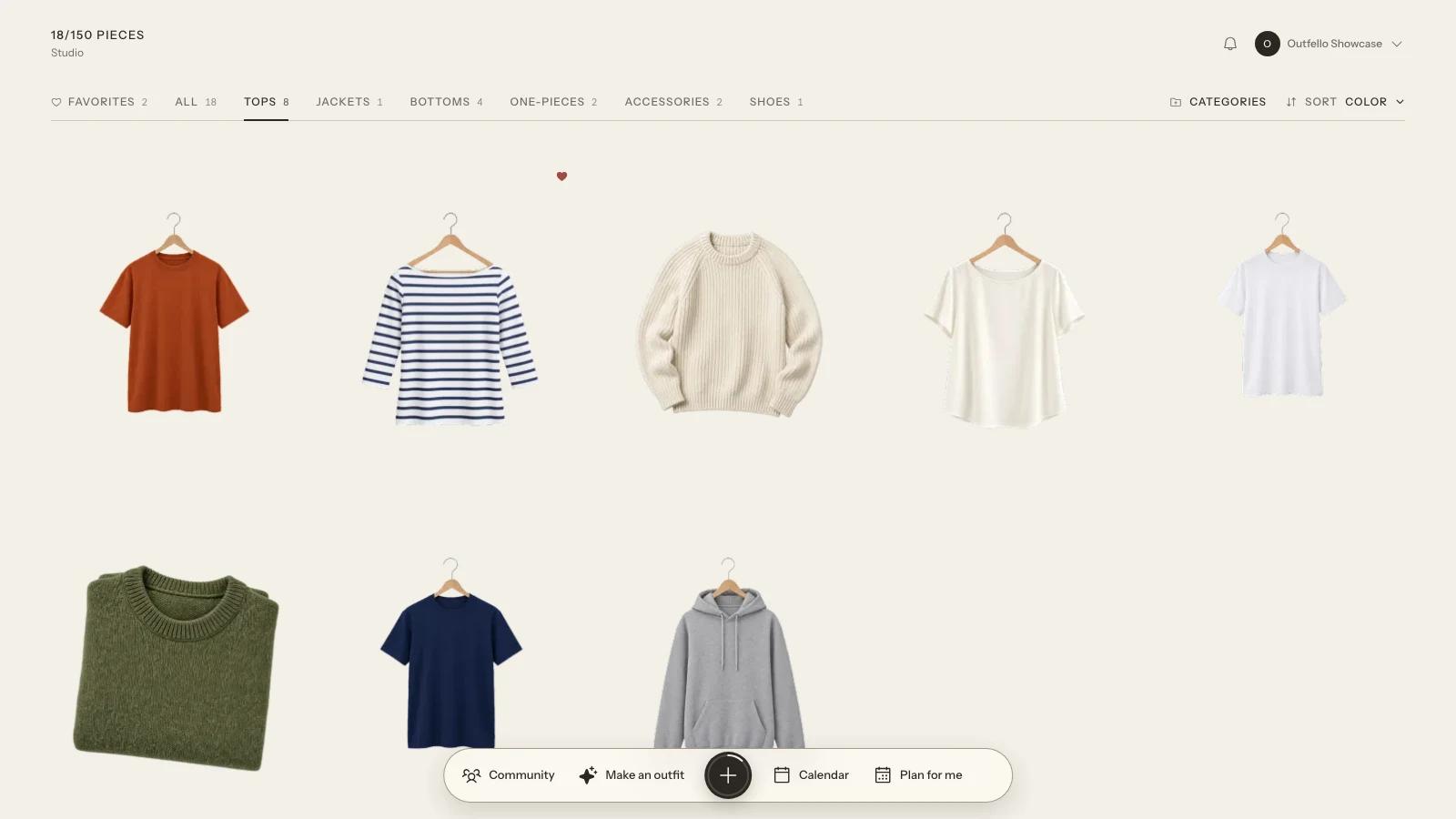 An online wardrobe, filtered by part
What you can do once it is online
- Browse it like a shop. Filter by tops, jackets, bottoms, shoes and accessories, and sort by colour to see what you really own. The catalogue side is covered on the digital closet page.
- Build outfits. Stack a jacket, top, bottoms, shoes and accessories into a look and save it next to the pieces it uses.
- See it on you. Add one full-body photo and render any piece or outfit onto it. See virtual try-on with your own clothes.
- Plan what to wear. Every plan suggests one outfit a day from your own clothes for today's weather. Paid plans add a chosen city, Tomorrow, planning several days ahead and a calendar. See the outfit planner page.
What it does not do
An online wardrobe is only as good as its scope, so here is where this one stops:
- The social side is opt-in. Your wardrobe is never listed publicly, but you can publish a look to the Community, a public feed where members like, save and comment on looks and mention each other. Nothing is posted unless you share it.
- There is no shop. Outfello catalogues what you own and does not sell or recommend clothes to buy.
- There is no text search. Filtering by part and sorting by colour or name is how you find things.
Getting started
The free plan needs no card and holds enough pieces to try it with a real part of your wardrobe; the limits for every plan are on the pricing page. Start with a few photos of the outfits you wear most often. Add them to the wardrobe app, review the detected pieces and save the ones you want to keep.
Questions
Frequently asked questions
- Is an online wardrobe the same as a digital closet?
- Mostly. Both are catalogues of the clothes you own. "Online" says where it lives, in your account and reachable from any browser, rather than inside an app on one phone. Outfello is both, and the digital closet page covers the catalogue side in more detail.
- Do I need to install anything?
- No. Outfello runs in any recent browser on a phone, tablet or computer. Sign in and the same wardrobe is there, with no app store download.
- Does it work without a connection?
- Each device keeps a local copy of the gallery, so you can browse your pieces offline. Importing new photos and rendering try-ons need a connection.
- Can anyone else see my online wardrobe?
- No. The wardrobe is private to your account. The only things other people can see are looks you choose to publish in the opt-in Community.
- Can I take my wardrobe with me?
- Yes. Account settings let you download everything the account holds as a single JSON file at any time.
Related
Keep reading
- Use caseA digital closet app built from your outfit photosUse Outfello as a digital closet app: import clothes from outfit photos, get every piece cut out and colour-tagged, and filter your wardrobe by category.
- GuideHow to digitize your wardrobe in an afternoonDigitize your wardrobe in one afternoon: start with the photos you already have, import by part, fix categories and colours, then shoot only the gaps.
- Use caseAn outfit planner app that works from your own clothesUse Outfello as an outfit planner app: stack your own cut-out clothes into looks, save the ones that work and get a daily outfit for the weather, free.